 Recipes
FlowyML Notebook includes a powerful Recipe System — pre-configured, reusable code templates for common ML tasks. Think "snippets on steroids," with usage tracking, team sharing, and automatic surfacing.
Recipe Library
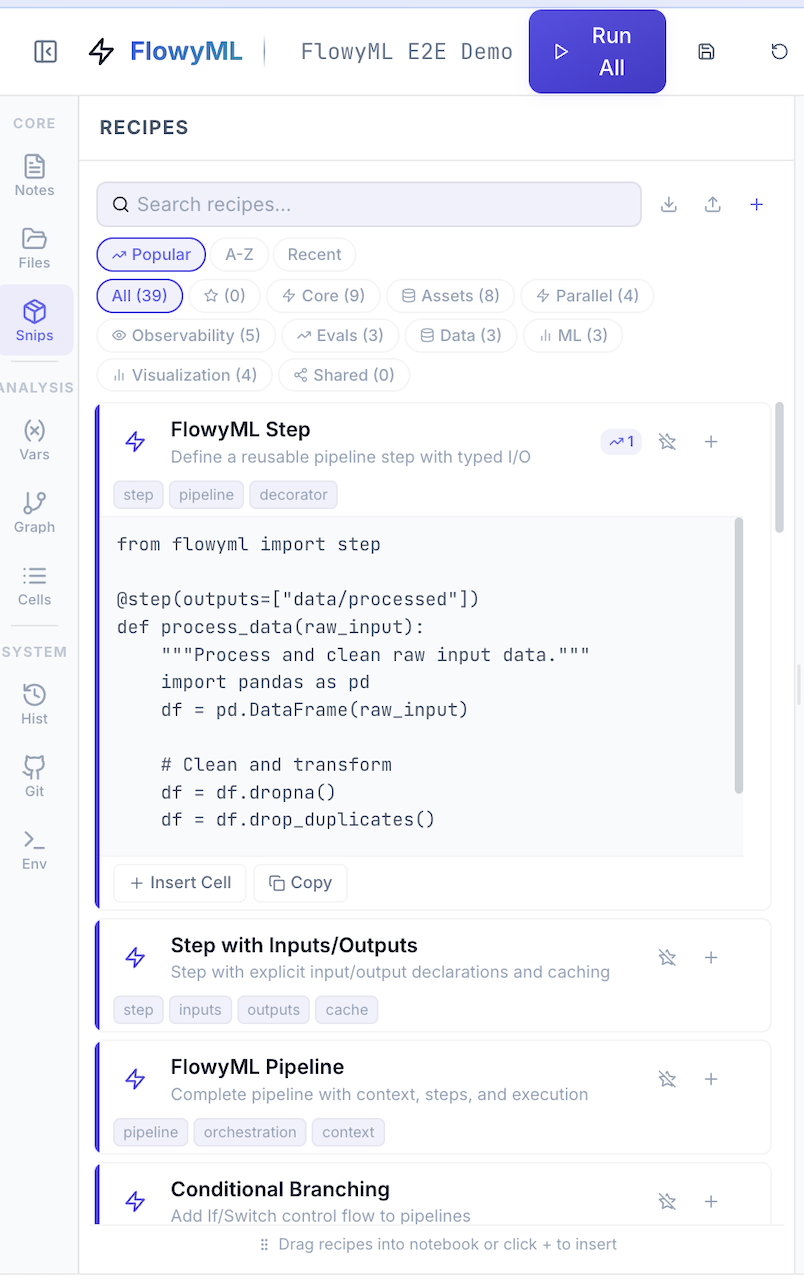
Built-in Categories
| Category | Count | Examples |
|---|---|---|
 Core Core |
14 | FlowyML Step, Pipeline, Conditional Branching, Scheduling |
 Assets Assets |
11 | Dataset loading, Model versioning, Experiment tracking |
 Parallel Parallel |
5 | Parallel map, Retry logic, Checkpointing, Smart caching |
 Observability Observability |
7 | GenAI tracing, OpenAI/LangChain observability, Drift detection |
 Evals Evals |
6 | Eval suites, Judge arena, Structured assessment |
 Production Production |
6 | Config management, FastAPI serving, Docker, CI/CD, Monitoring, A/B Testing |
 Deep Learning Deep Learning |
5 | PyTorch training, Transfer learning, Optuna tuning, SHAP explainability |
 NLP NLP |
5 | Text classification, Sentiment analysis, Topic modeling, NER, Embeddings |
 Time Series Time Series |
5 | Seasonal decomposition, ARIMA, Prophet, Anomaly detection, Rolling features |
 Data Engineering Data Engineering |
5 | ETL pipeline, Data quality, DuckDB analytics, SQLAlchemy, Schema evolution |
 Data Prep Data Prep |
7 | Imputation, Feature selection, Outlier treatment, SMOTE |
 ML / Models ML / Models |
3 | XGBoost/LightGBM baselines, Feature engineering |
 Visualization Visualization |
4 | Plotly charts, SHAP/LIME, Dashboard templates |
 Ecosystem Ecosystem |
4 | KDP preprocessing, KerasFactory model, MLPotion training, E2E pipeline |
Using a Recipe
- Open the Snips panel in the sidebar
- Browse or search for a recipe (search filters by name, category, and tags)
- Click + to insert into your notebook at the cursor position
- Customize the template for your use case
Most Used First
Recipes track usage counts automatically. Your most-used recipes surface first in the Popular tab — no manual favorites needed.
Creating Custom Recipes
Save any cell as a reusable recipe:
- Write your code in a cell
- Click the "Save as Recipe" icon in the cell toolbar
- Provide a Name, Category, Tags, and Description
Custom recipes are stored locally as .recipe.json files:
Recipe Format
Each recipe is a self-contained JSON file:
Managing Recipes
Via Python API
Import & Export
Move recipes between machines or share outside of GitHub:
Sharing Recipes via GitHub
When connected to a GitHub repository (see Collaboration), recipes can be pushed to the shared team hub:
| Method | How |
|---|---|
| Push to Hub | Toggle "Share to Hub" when saving → recipe is committed to .flowyml-hub/recipes/ |
| Pull from Hub | Click Pull in Git panel → team recipes appear in the Shared tab |
| Manual Export | Export as JSON and share directly |
Shared Recipe Catalog
The hub maintains a catalog.json index for fast browsing:
When a teammate pushes a recipe, it appears in the Shared tab for everyone who pulls.
Best Practices
Recipe Tips
- Name clearly —
XGBoost Quick Baseline>my_model - Tag generously — Tags power search:
["xgboost", "classification", "baseline"] - Keep focused — One recipe = one task. Don't mix data loading with model training
- Document parameters — Use comments to explain what to customize
- Share to Hub — If it helped you, it'll help your team
UnicoLab Ecosystem Recipes
FlowyML Notebook includes 4 builtin ecosystem recipes that provide ready-to-use workflows for the UnicoLab ML stack:
| Recipe | Package | What It Does |
|---|---|---|
 KDP Smart Preprocessing KDP Smart Preprocessing |
kdp |
Auto-configure Keras preprocessing layers — feature types, distribution-aware encoding, tabular attention |
| KerasFactory Quick Model |
kerasfactory |
Build tabular models with BaseFeedForwardModel or custom GRN/attention architectures |
 MLPotion Training Pipeline MLPotion Training Pipeline |
mlpotion |
Managed training with ModelTrainer and type-safe ModelTrainingConfig |
| UnicoLab End-to-End Pipeline |
All 3 | Complete KDP → KerasFactory → MLPotion workflow in one recipe |
Ecosystem recipes appear alongside your custom and shared recipes in the Snips panel. They are tagged with unicolab for easy search.
Installing Ecosystem Packages
See Ecosystem for the full integration guide.