🧩 Feature-wise Mixture of Experts
Feature-wise Mixture of Experts (MoE)
Specialized processing for heterogeneous tabular features
📋 Overview
Feature-wise Mixture of Experts (MoE) is a powerful technique that applies different processing strategies to different features based on their characteristics. This approach allows for more specialized handling of each feature, improving model performance on complex, heterogeneous datasets.
🚀 Basic Usage
from kdp import PreprocessingModel, FeatureType

# Define features
features = {
    "age": FeatureType.FLOAT_NORMALIZED,
    "income": FeatureType.FLOAT_RESCALED,
    "occupation": FeatureType.STRING_CATEGORICAL,
    "purchase_history": FeatureType.FLOAT_NORMALIZED,
}

# Create preprocessor with Feature MoE
preprocessor = PreprocessingModel(
    path_data="data.csv",
    features_specs=features,
    use_feature_moe=True,               # Turn on the magic
    feature_moe_num_experts=4,          # Four specialized experts
    feature_moe_expert_dim=64           # Size of expert representations
)

# Build and use
result = preprocessor.build_preprocessor()
model = result["model"]
🧩 How Feature MoE Works
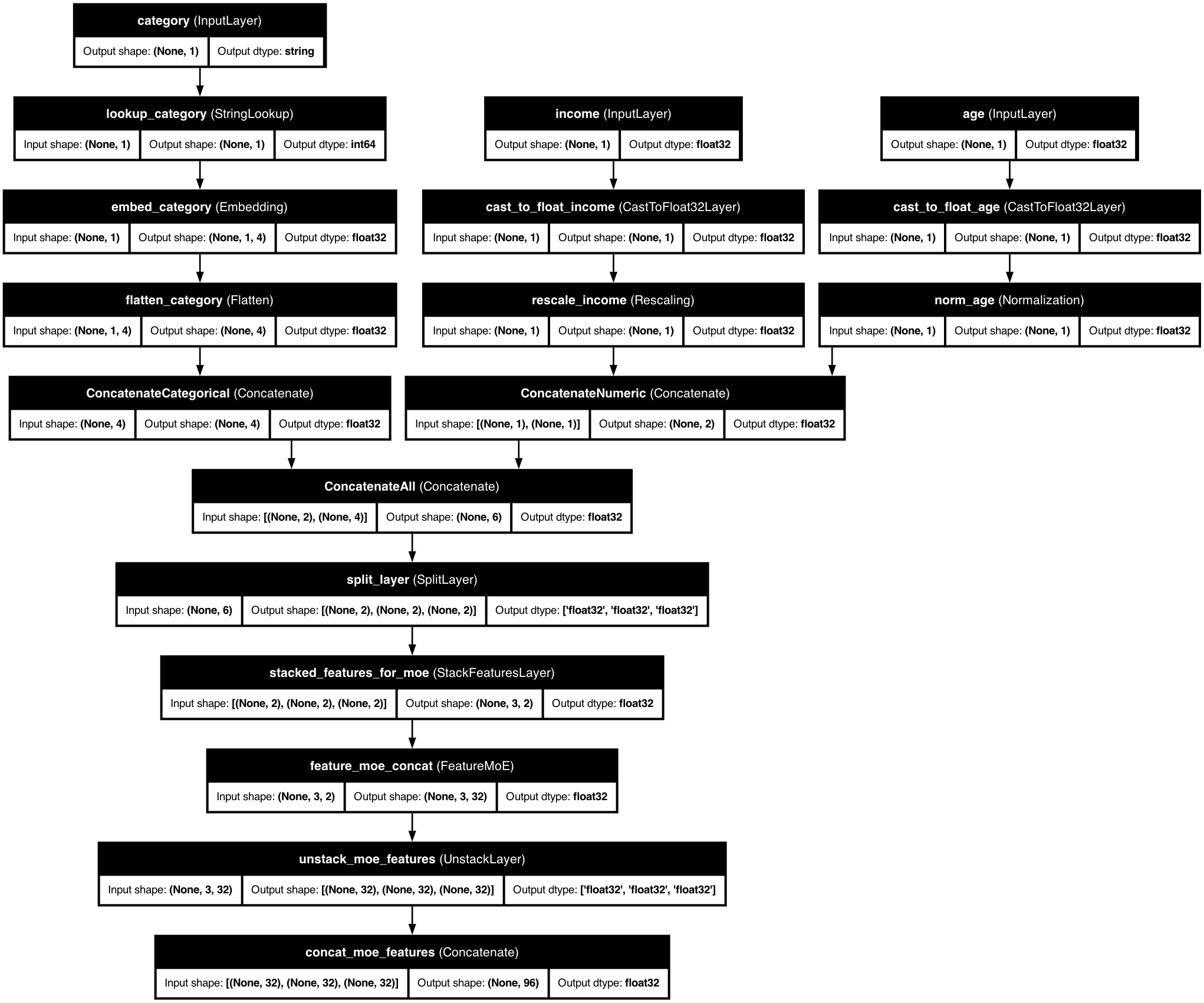
KDP's Feature MoE uses a "divide and conquer" approach with smart routing: each expert is a specialized neural network, a router determines which experts should process each feature, features can use multiple experts with different weights, and residual connections preserve original feature information.
⚙️ Configuration Options
| Parameter | Description | Default | Recommended Range |
|---|---|---|---|
feature_moe_num_experts |
Number of specialists | 4 | 3-5 for most tasks, 6-8 for very complex data |
feature_moe_expert_dim |
Size of expert output | 64 | Larger (96-128) for complex patterns |
feature_moe_routing |
How to assign experts | "learned" | "learned" for automatic, "predefined" for control |
feature_moe_sparsity |
How many experts each feature may use. Setting it to feature_moe_num_experts routes densely. |
2 | 1-3 (lower = faster, higher = more accurate) |
feature_moe_hidden_dims |
Expert network size | [64, 32] | Deeper for complex relationships |
feature_moe_assignments |
Feature → expert index map, required by "predefined" routing |
None | Group related features onto the same expert index |
feature_moe_dropout |
Dropout applied inside every expert network | 0.1 | 0.0-0.3 (raise it when experts overfit) |
feature_moe_freeze_experts |
Freeze expert weights so only the router trains | False | True when reusing pretrained experts |
feature_moe_use_residual |
Add the original feature back onto its expert output | True | Keep True unless you want experts to fully replace the input |
🎛️ Steering the Experts
The router is not the only control you have. Four extra parameters decide how experts are assigned, trained and combined.
Hand-picked routing
Set feature_moe_routing="predefined" and hand KDP a feature_moe_assignments
map to place each feature on a specific expert yourself. Features that share an
expert index are processed by the same specialist network.
from kdp import PreprocessingModel, FeatureType

features = {
    "age": FeatureType.FLOAT_NORMALIZED,
    "income": FeatureType.FLOAT_RESCALED,
    "occupation": FeatureType.STRING_CATEGORICAL,
    "education": FeatureType.STRING_CATEGORICAL,
}

preprocessor = PreprocessingModel(
    path_data="data.csv",
    features_specs=features,
    use_feature_moe=True,
    feature_moe_num_experts=2,
    feature_moe_routing="predefined",
    feature_moe_assignments={
        "age": 0,          # expert 0 gets the demographic signals
        "education": 0,
        "income": 1,       # expert 1 gets the financial ones
        "occupation": 1,
    },
)

result = preprocessor.build_preprocessor()
The map has to be complete. KDP raises a ValueError naming the gaps if a
routed feature has no expert, because the assignment matrix doubles as the
router's weights — an unassigned feature would be multiplied by zero and
vanish from the model. Expert indices are range-checked too, and an index may
be a weight map ({0: 0.7, 1: 0.3}) to split one feature across experts.
In concat output mode only numeric and categorical features reach the
mixture, so those are the names the map may contain; the error lists the exact
set if you name something else.
Regularising, freezing and residuals
from kdp import PreprocessingModel, FeatureType

features = {
    "age": FeatureType.FLOAT_NORMALIZED,
    "income": FeatureType.FLOAT_RESCALED,
    "occupation": FeatureType.STRING_CATEGORICAL,
}

preprocessor = PreprocessingModel(
    path_data="data.csv",
    features_specs=features,
    use_feature_moe=True,
    feature_moe_num_experts=3,
    feature_moe_dropout=0.2,        # dropout inside every expert network
    feature_moe_freeze_experts=False,  # True keeps expert weights fixed
    feature_moe_use_residual=True,  # add the input back onto the expert output
)

result = preprocessor.build_preprocessor()
| Parameter | What it changes | Reach for it when |
|---|---|---|
feature_moe_dropout |
Inserts a Dropout layer after every hidden layer of every expert. 0.0 removes the layers entirely. |
Experts memorise the training set, or you have many experts and little data. |
feature_moe_freeze_experts |
Marks every expert non-trainable, so gradients only reach the router and the surrounding layers. | You loaded pretrained experts, or you want the router to settle before fine-tuning. |
feature_moe_use_residual |
Adds the untouched feature representation onto the expert output. Applied per feature, only where the two widths already match. | Almost always — it keeps the original signal reachable. Turn it off when experts should fully replace their input. |
Residuals need matching widths
The residual is a plain Add, so it only fires for features whose
preprocessed width already equals feature_moe_expert_dim. Features of a
different width pass through the expert output alone — no error, no
silent reshape.
Reading the routing back
get_expert_assignments() on the mixture layer reports, per feature, how much
of it each expert handles. Predefined routing answers from the map you gave it;
learned routing decides from the data, so hand it a batch.
moe = preprocessor.model.get_layer("feature_moe_concat")

# Predefined routing: the map you supplied, normalised to weights.
print(moe.get_expert_assignments())
# {"age": {0: 1.0}, "income": {1: 1.0}, ...}
With learned routing, pass the stacked features the layer sees. Each row keeps
only the experts with a non-zero share, so a run with feature_moe_sparsity=2
lists two experts per feature and their weights sum to one.
💡 Pro Tips for Feature MoE
Group Similar Features
Assign related features to the same expert for consistent processing, like grouping demographic, financial, product, and temporal features to different experts.
Visualize Expert Assignments
Read the routing off the layer with get_expert_assignments() and plot it as a heatmap. See the section below for the call.
Progressive Training
Start with frozen experts, then fine-tune to allow the model to learn basic patterns before specializing.
🔍 When to Use Feature MoE
Heterogeneous Features
When your features have very different statistical properties (categorical, text, numerical, temporal).
Complex Multi-Modal Data
When features come from different sources or modalities (user features, item features, interaction features).
Transfer Learning
When adapting a model to new features with domain-specific experts for different feature groups.