⚡ Transformer Blocks
Transformer Blocks
Powerful self-attention mechanisms for tabular data
📋 Overview
Transformer Blocks in KDP bring the power of self-attention mechanisms to tabular data processing. These blocks enable your models to capture complex feature interactions and dependencies through sophisticated attention mechanisms, leading to better model performance on structured data.
Self-Attention
Capture complex feature interactions
Multi-Head Processing
Learn diverse feature relationships
Efficient Computation
Optimized for tabular data
Feature Importance
Learn which features matter most
🚀 Getting Started
from kdp import PreprocessingModel, FeatureType

# Define features
features_specs = {
    "age": FeatureType.FLOAT_NORMALIZED,
    "income": FeatureType.FLOAT_RESCALED,
    "occupation": FeatureType.STRING_CATEGORICAL,
    "education": FeatureType.INTEGER_CATEGORICAL
}

# Initialize model with transformer blocks
preprocessor = PreprocessingModel(
    path_data="data/my_data.csv",
    features_specs=features_specs,
    transfo_nr_blocks=3,            # Number of transformer blocks
    transfo_nr_heads=4,             # Number of attention heads
    transfo_ff_units=64,            # Feed-forward hidden dimension
)
🧠 How It Works
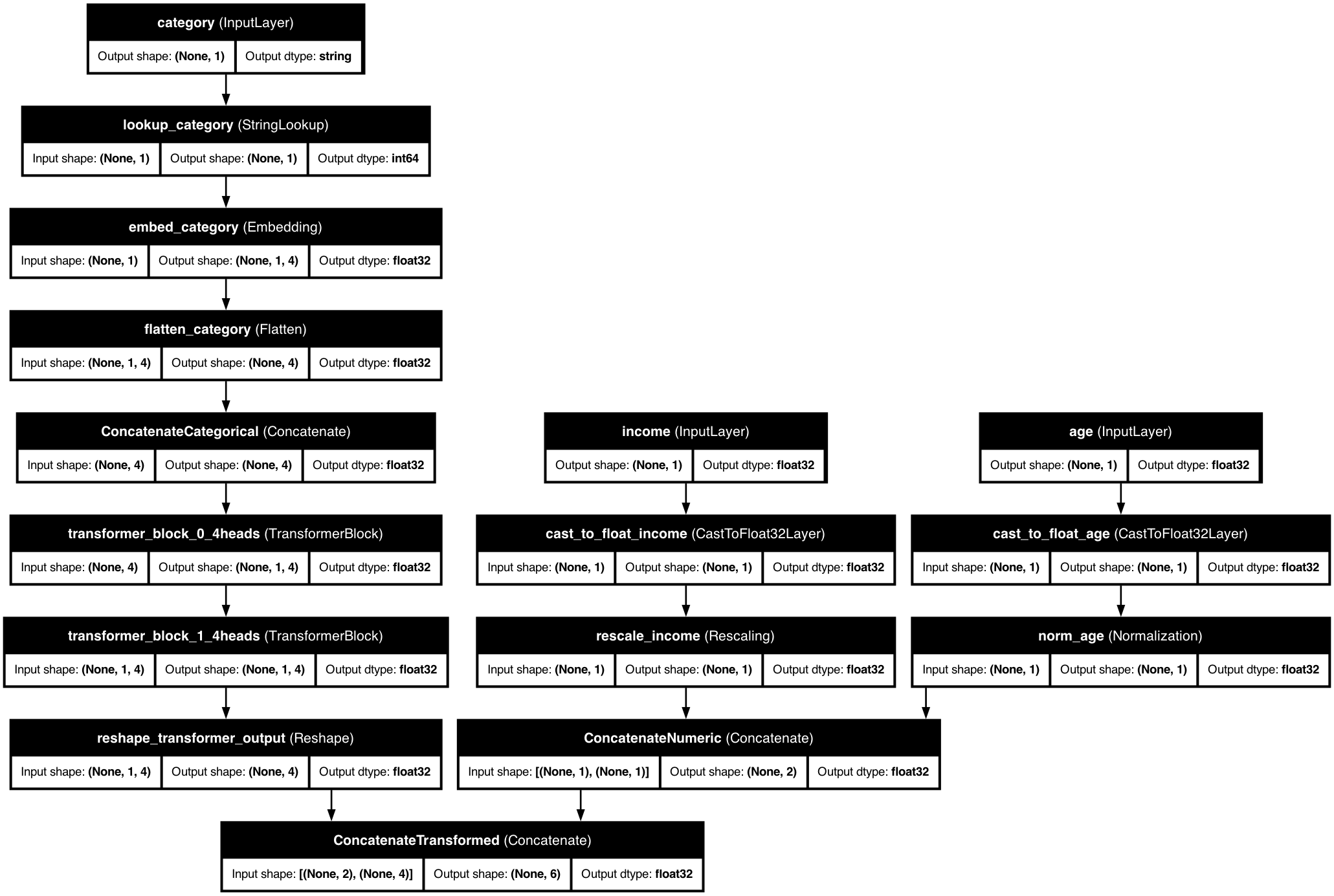
KDP's transformer blocks process tabular data through multiple layers of self-attention and feed-forward networks, enabling the model to learn complex feature interactions and dependencies.
⚙️ Configuration Options
| Parameter | Type | Default | Description |
|---|---|---|---|
transfo_nr_blocks |
int | None | None | Number of transformer blocks. Setting this is what enables them — leave it None and no blocks are added. |
transfo_nr_heads |
int | 4 | Number of attention heads |
transfo_ff_units |
int | 64 | Hidden dimension |
transfo_dropout_rate |
float | 0.1 | Dropout rate |
💡 Pro Tips
Block Configuration
Start with 2-3 blocks and increase based on feature complexity. More blocks can capture deeper interactions but may lead to overfitting.
Head Selection
Use 4-8 heads for most tasks. More heads can capture diverse relationships but increase computational cost.
Dimension Tuning
Choose dimensions divisible by number of heads. Larger dimensions capture more complex patterns but require more computation.
🔍 Examples
Customer Analytics
from kdp import FeatureType, PreprocessingModel

features_specs = {
    "age": FeatureType.FLOAT_NORMALIZED,
    "income": FeatureType.FLOAT_RESCALED,
    "tenure": FeatureType.FLOAT_NORMALIZED,
    "purchases": FeatureType.FLOAT_RESCALED,
    "customer_type": FeatureType.STRING_CATEGORICAL,
    "region": FeatureType.STRING_CATEGORICAL
}

preprocessor = PreprocessingModel(
    path_data="data/customer_data.csv",
    features_specs=features_specs,
    transfo_nr_blocks=4,            # More blocks for complex customer patterns
    transfo_nr_heads=8,             # More heads for diverse relationships
    transfo_ff_units=128,                 # Larger dimension for rich representations
    transfo_dropout_rate=0.2              # Higher dropout for regularization
)
Product Recommendations
from kdp import FeatureType, PreprocessingModel

features_specs = {
    "user_id": FeatureType.INTEGER_CATEGORICAL,
    "item_id": FeatureType.INTEGER_CATEGORICAL,
    "category": FeatureType.STRING_CATEGORICAL,
    "price": FeatureType.FLOAT_NORMALIZED,
    "rating": FeatureType.FLOAT_NORMALIZED,
    "timestamp": FeatureType.DATE
}

preprocessor = PreprocessingModel(
    path_data="data/recommendation_data.csv",
    features_specs=features_specs,
    transfo_nr_blocks=3,            # Standard configuration
    transfo_nr_heads=4,             # Balanced number of heads
    transfo_ff_units=64,                  # Moderate dimension
    transfo_dropout_rate=0.1              # Standard dropout
)