FlowyML 🌊
Your code stays the same. Only the infrastructure changes.
💡 What is FlowyML?
The open-source Python framework that completely decouples your ML code from infrastructure.
Most ML teams waste months wrestling with infrastructure instead of building models. FlowyML fixes this with three core principles:
🔓 Code ≠ Infrastructure
Your ML code is completely independent of where it runs. Develop locally on a laptop, then deploy the exact same code to GCP Vertex AI, AWS SageMaker, or Azure ML. Switch clouds with one environment variable — zero code changes, zero rewrites, zero vendor lock-in.
📦 Artifact-Centric DAGs
Forget manual DAG wiring. Steps declare what data they produce and consume — FlowyML builds the execution graph automatically. Models, Datasets, and Metrics are first-class citizens with automatic lineage, versioning, and type-safe connections.
🏭 Production from Day One
Every pipeline gets smart caching, parallel execution, drift monitoring, 29+ evaluation scorers, a beautiful dark-mode dashboard, and built-in GenAI observability. Not as add-ons — out of the box.
The Bottom Line
Write a Python function → Add the @step decorator → Get a production pipeline with caching, lineage tracking, cloud deployment, and a monitoring dashboard. No arrows. No DSLs. No YAML hell. No infrastructure rewrites.
⚡ See the Difference
# Airflow / Prefect style
@task
def load_data():
    data = fetch_dataset()
    save_to_s3("s3://bucket/data.csv", data)
    return "s3://bucket/data.csv"

@task
def train(data_path: str):
    data = load_from_s3(data_path)
    model = fit(data)
    save_to_s3("s3://bucket/model.pkl", model)

# Manual wiring required!
load_task = load_data()
train_task = train(load_task)
load_task >> train_task  # 😩 Arrows everywhere
from flowyml import Pipeline, step, Model

@step(outputs=["dataset"])
def load_data() -> list:
    return fetch_dataset()

@step(inputs=["dataset"], outputs=["model"])
def train(dataset: list) -> Model:
    return Model(fit(dataset))

# Zero arrows — DAG builds itself!
pipeline = Pipeline.from_steps(
    load_data, train, name="my_pipeline"
)
pipeline.run()  # 🎉 Done!
💡 What just happened?
FlowyML auto-discovered that train depends on load_data through the dataset artifact. No >> arrows, no .set_downstream(), no manual S3 paths. Just Python.
🏗️ How FlowyML Works
🔌 Works With the Tools You Already Use
15+ integrations across the ML ecosystem — from scikit-learn to LangChain, PyTorch to Vertex AI.
🔓 How Infrastructure Decoupling Works
Your code, FlowyML's orchestration layer, and your infrastructure are three independent layers. Swap any layer without touching the others.
The Key Insight
Traditional frameworks mix infrastructure into your code (save_to_s3(), load_from_gcs()). FlowyML eliminates this entirely. Your steps produce artifacts by name — FlowyML routes them to the right infrastructure based on your stack config. Switch from local development to GCP production with export FLOWYML_STACK=production. Zero code changes.
🚀 Built For Every ML Workflow
Model Training
End-to-end training pipelines with data loading, preprocessing, training, evaluation, and model registry. Smart caching skips unchanged steps.
GenAI & LLM Apps
Build RAG pipelines, fine-tuning workflows, and LLM evaluation suites. Built-in tracing tracks every token, cost, and latency across LangChain, OpenAI, and more.
Evaluation & CI/CD
29+ built-in scorers for classification, regression, and LLM-as-a-Judge. Automatic quality gates block bad models from production.
Continuous Training
Scheduled re-training with drift detection, data validation, and automatic model promotion. Full experiment lineage for audit and reproducibility.
🎯 Feature Highlights
Decouple Code from Infrastructure
Your ML code never touches infrastructure. Develop on a laptop, deploy to Vertex AI, SageMaker, or Azure ML. Switch clouds with export FLOWYML_STACK=prod — zero code changes.
Artifact-Centric Pipelines
Steps declare what data they produce and consume. The DAG builds itself — no manual wiring. Models, Datasets, and Metrics are first-class citizens with automatic lineage.
GenAI Observability
Built-in LLM tracing for LangGraph, LangChain, OpenAI SDK, or any framework. Track every token, cost, and latency. No LangSmith needed.
29+ Evaluation Scorers
Production-grade evaluation: classification, regression, and GenAI (LLM-as-a-Judge). Adapters for DeepEval, RAGAS, and Phoenix. CI/CD quality gates built in.
Beautiful Dashboard
Dark-mode web UI with pipeline DAG visualization, experiment comparison, artifact inspection, GenAI traces, and model training curves — all in real-time.
Smart Caching & Performance
Content-based hashing skips unchanged steps. Parallel execution, map tasks, step grouping, and lazy evaluation keep your pipelines fast.
Dynamic Workflows
Generate sub-pipelines at runtime with @dynamic. Run hyperparameter sweeps, conditional branches, and human-in-the-loop approvals.
Plugin Ecosystem
Extensible architecture with plugins for MLflow, W&B, Slack, Docker, Kubernetes, and more. Import 50+ ZenML integrations with one line.
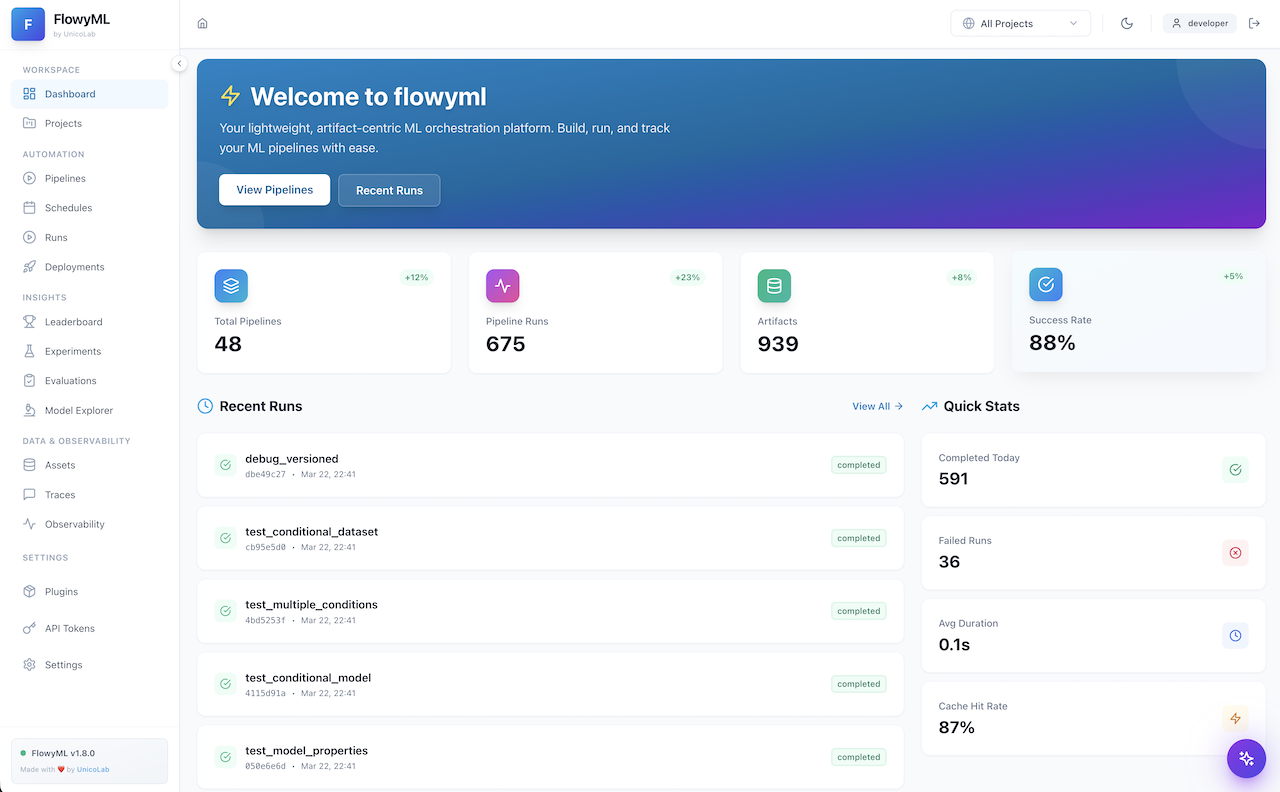
🖥️ The Dashboard
FlowyML ships with a full-featured web dashboard for monitoring, debugging, and managing your entire ML lifecycle.
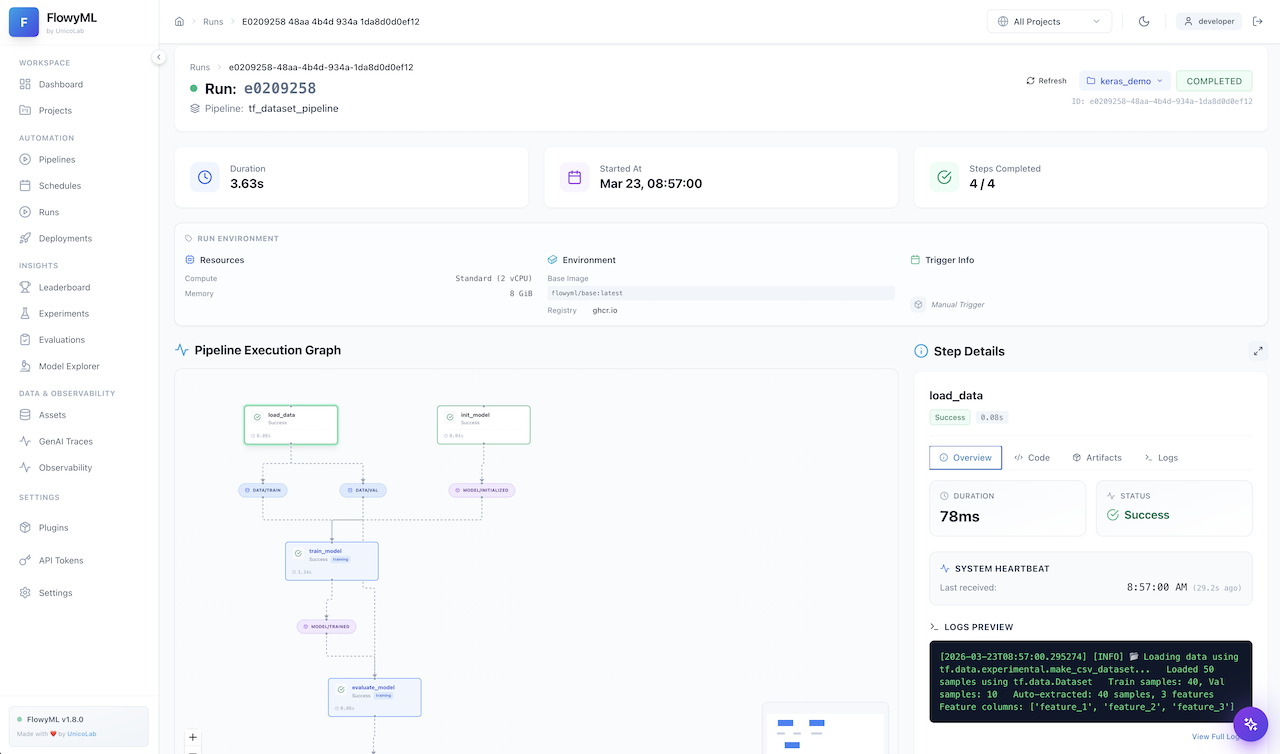
Pipeline DAG — Real-time step status
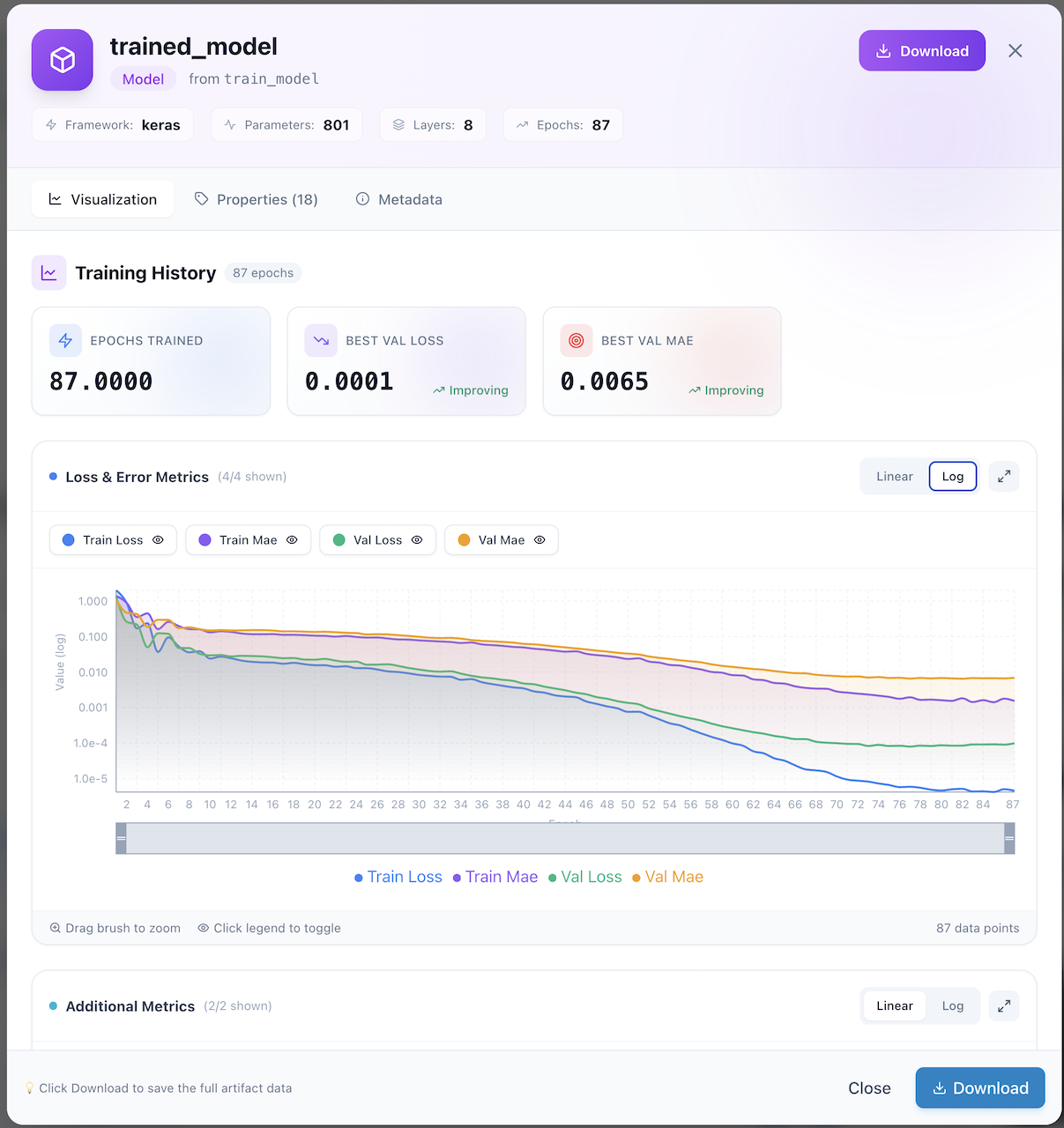
Training Curves — Interactive charts
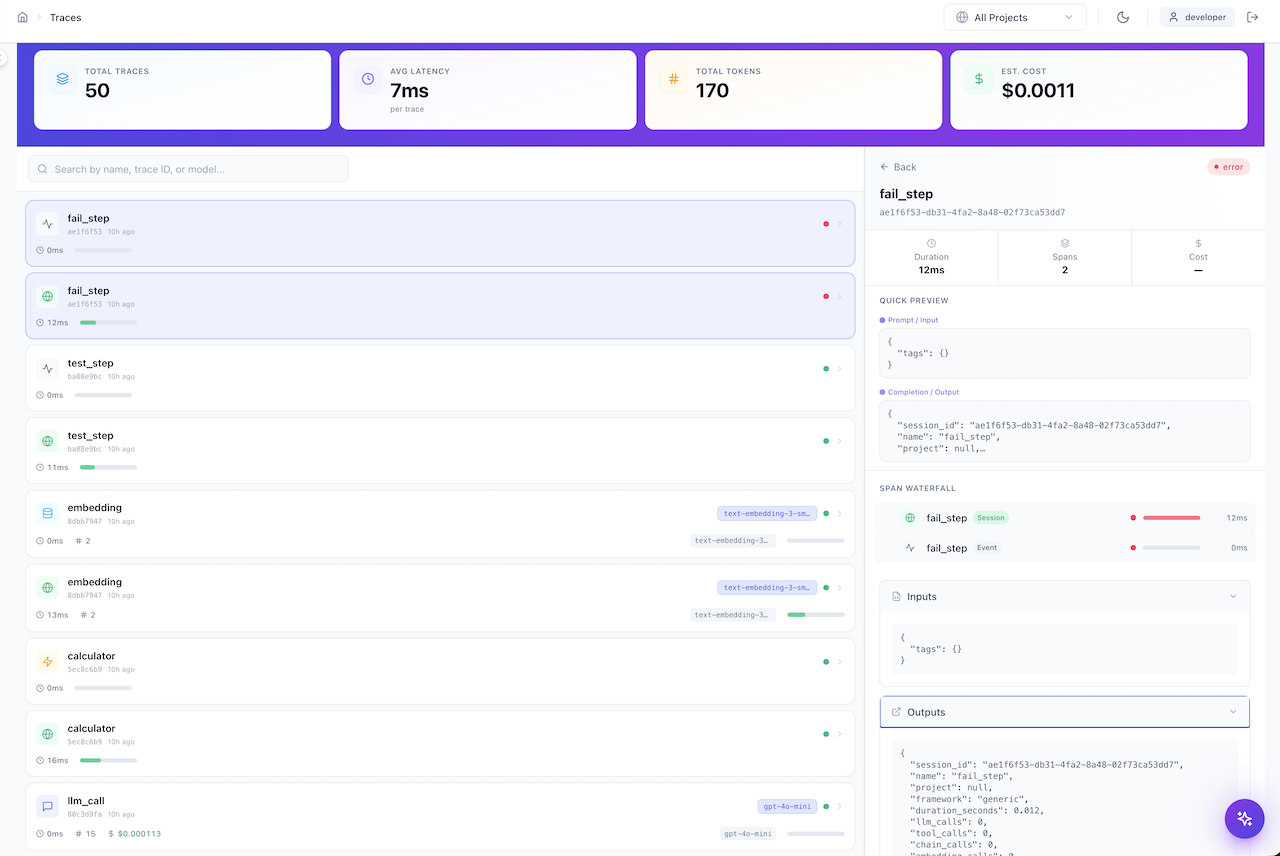
GenAI Traces — Token & cost monitoring
📊 How FlowyML Compares
Many ML platforms offer powerful features — but lock them behind paid tiers or enterprise-only editions. FlowyML's mission is to deliver enterprise-grade capabilities as 100% open-source, community-driven software. No feature walls. No upgrade prompts.
Feature Matrix — What's Included vs. What You'd Pay For Elsewhere
🏗️ Core Pipeline & Orchestration
| Capability | General Orchestrators | ML Platforms (Free) | ML Platforms (Pro / Enterprise) | FlowyML (Free, Always) |
|---|---|---|---|---|
| Pipeline Orchestration | ✅ | ✅ | ✅ | ✅ |
| DAG Construction | Manual wiring (>>, .after()) |
Manual wiring | Manual wiring | ✅ Auto-inferred from artifacts |
| Code ↔ Infra Decoupling | ❌ Tightly coupled | ⚠️ Partial | ⚠️ Partial | ✅ Complete — one env var to switch |
| Multi-Cloud Deploy | ❌ Vendor-locked | ⚠️ 1–2 clouds | ✅ Paid add-on | ✅ GCP + AWS + Azure out of the box |
| Smart Caching | ⚠️ File-timestamp | ⚠️ Basic | ✅ Content-hash | ✅ Content-hash (code + data + config) |
| Type Safety | ❌ Runtime failures | ⚠️ Partial | ⚠️ Partial | ✅ Build-time validation |
📦 Artifacts, Models & Evaluation
| Capability | General Orchestrators | ML Platforms (Free) | ML Platforms (Pro / Enterprise) | FlowyML (Free, Always) |
|---|---|---|---|---|
| Artifact Catalog & Lineage | ❌ External tools | ⚠️ Basic | ✅ Paid tier | ✅ Built-in versioning & lineage |
| Model Registry | ❌ Separate product | ⚠️ Basic | ✅ Paid tier | ✅ Built-in promotion & tagging |
| Evaluation Scorers | ❌ None | ⚠️ 1–3 basic | ⚠️ Limited | ✅ 29+ (classification, regression, LLM-as-Judge) |
| Quality Gates / CI-CD | ❌ Build-your-own | ❌ Manual | ✅ Paid tier | ✅ Built-in eval-based gates |
| Data Drift Monitoring | ❌ Separate product | ❌ None | ⚠️ Add-on | ✅ Built-in statistical monitors |
| Model Leaderboard | ❌ None | ❌ None | ⚠️ Add-on | ✅ Built-in with metric ranking |
🤖 GenAI & Observability
| Capability | General Orchestrators | ML Platforms (Free) | ML Platforms (Pro / Enterprise) | FlowyML (Free, Always) |
|---|---|---|---|---|
| GenAI / LLM Tracing | ❌ None | ❌ None | ⚠️ Add-on or separate product | ✅ Built-in tracing, token counts, cost |
| LLM-as-a-Judge Evaluation | ❌ None | ❌ None | ⚠️ Limited | ✅ Built-in with arena A/B testing |
| Dashboard & UI | ⚠️ Basic (Airflow UI) | ⚠️ Basic | ✅ Full (paid) | ✅ Included — dark mode, DAGs, traces |
| Notebook → Pipeline | ❌ Manual | ❌ Manual | ⚠️ Limited | ✅ One-click via FlowyML Notebook |
🏢 Enterprise & Production
| Capability | General Orchestrators | ML Platforms (Free) | ML Platforms (Pro / Enterprise) | FlowyML (Free, Always) |
|---|---|---|---|---|
| REST API (Pipeline Triggers) | ⚠️ Limited | ❌ None | ✅ Paid tier | ✅ 121 endpoints — execute, query, manage |
| API Token Authentication | ❌ None | ❌ None | ✅ Paid tier | ✅ Built-in with per-token permissions |
| Project Separation | ❌ None | ❌ None | ✅ Paid tier | ✅ Built-in — isolate teams & experiments |
| On-Premises Deployment | ⚠️ Self-host | ⚠️ Limited | ✅ Enterprise license | ✅ Full self-hosted — no license needed |
| Model Serving & Inference | ❌ Separate product | ❌ None | ✅ Paid add-on | ✅ Built-in one-click model deployment |
| Pipeline Scheduling (Cron) | ✅ | ⚠️ Basic | ✅ Full | ✅ Built-in daily, hourly, cron, interval |
| WebSocket Live Streaming | ❌ None | ❌ None | ⚠️ Limited | ✅ Built-in real-time run updates |
| Notifications (Slack, Email) | ⚠️ Plugin | ⚠️ Plugin | ✅ Included | ✅ Built-in multi-channel |
| Developer Experience | YAML configs, rigid DSLs | Python SDK | Python SDK | ✅ Pure Python — no DSLs, no YAML |
💡 Our Philosophy
We believe ML infrastructure should be democratized. Every data scientist — whether at a startup or in a research lab — deserves enterprise-grade tooling without enterprise-grade pricing. FlowyML ships 121 API endpoints, project isolation, token-based auth, model serving, and full on-premises deployment in one pip install — with no upsell, no license keys, and no feature gates. Ever.
🔄 How Artifacts Flow Through Infrastructure
FlowyML automatically routes artifacts to your configured infrastructure based on their type.
graph TB
    subgraph "Your Code"
        S1["@step → Model"] --> A1["🤖 Model Artifact"]
        S2["@step → Metrics"] --> A2["📊 Metrics Dict"]
        S3["@step → Dataset"] --> A3["📋 Dataset"]
    end

    subgraph "flowyml.yaml Routing"
        A1 -->|"model_registry"| REG["🏷️ Model Registry"]
        A1 -->|"artifact_store"| GCS["☁️ Cloud Storage"]
        A2 -->|"experiment_tracker"| MLF["🔬 MLflow / W&B"]
        A3 -->|"artifact_store"| GCS
    end
The Golden Rule
No stack configured? → Artifacts saved locally. Stack configured? → Artifacts auto-routed to cloud based on type. Zero code changes.
🌊 FlowyML Notebook — The Reactive Notebook That Ships to Production
FlowyML Notebook is a companion reactive notebook environment that replaces Jupyter for ML workflows. Write Python cells with automatic dependency tracking, then promote directly to FlowyML pipelines with one click.
Key features: SmartPrep Advisor · Algorithm Matchmaker · GitHub Integration · SQL First-Class · App Mode · Rich Data Exploration
🗺️ Explore the Documentation
-
 Getting Started
---
Build your first pipeline in 5 minutes. Install, create, run, and monitor.
Getting Started
---
Build your first pipeline in 5 minutes. Install, create, run, and monitor. -
 Core Concepts
---
Master Pipelines, Steps, Context, and Artifact Lineage — the heart of FlowyML.
Core Concepts
---
Master Pipelines, Steps, Context, and Artifact Lineage — the heart of FlowyML. -
 Features Explorer
---
Deep dive into 20+ features: evaluations, caching, drift detection, templates, and more.
Features Explorer
---
Deep dive into 20+ features: evaluations, caching, drift detection, templates, and more. -
 GUI Dashboard
---
Visual tour of the web dashboard: DAGs, metrics, traces, and deployments.
GUI Dashboard
---
Visual tour of the web dashboard: DAGs, metrics, traces, and deployments. -
 Plugins & Stacks
---
Multi-cloud deployment, artifact routing, and the extensible plugin architecture.
Plugins & Stacks
---
Multi-cloud deployment, artifact routing, and the extensible plugin architecture. -
 Ecosystem
---
FlowyML Notebook, UnicoLab Keras tools, and the full integration landscape.
Ecosystem
---
FlowyML Notebook, UnicoLab Keras tools, and the full integration landscape.