📚 Examples
📚 Examples & Cookbooks
Learn FlowyML by running real code. From 5-line quick starts to production-grade ML pipelines — every example is copy-pasteable and available in the examples/ directory.
🚀 Quick Start 🤖 Machine Learning ⚡ Caching ☁️ Cloud Stacks 🏭 Production
Example Categories
🚀 Quick Start
Minimal pipelines to get you up and running in minutes. Perfect for first-time users.
🤖 Machine Learning
Training pipelines with context, feature engineering, model evaluation, and experiment tracking.
⚡ Advanced Features
Caching strategies, conditional execution, custom executors, and more.
☁️ Stacks & Cloud
Local and GCP stack configurations for artifact storage and cloud orchestration.
Quick Start Examples
Simple Pipeline
A minimal pipeline demonstrating the basics:
from flowyml import Pipeline, step

@step(outputs=["numbers"])
def generate_numbers():
    return list(range(10))

@step(inputs=["numbers"], outputs=["doubled"])
def double_numbers(numbers):
    return [x * 2 for x in numbers]

# Create and run pipeline
pipeline = Pipeline("simple_example")
pipeline.add_step(generate_numbers)
pipeline.add_step(double_numbers)

result = pipeline.run()
print(f"Result: {result.outputs['doubled']}")
📄 Full example: examples/simple_pipeline.py
ETL Pipeline
Extract, Transform, Load pattern with caching:
from flowyml import Pipeline, step, context
import pandas as pd

@step(outputs=["raw_data"], cache="code_hash")
def extract():
    """Extract data from source."""
    return pd.read_csv("data/source.csv")

@step(inputs=["raw_data"], outputs=["clean_data"], cache="input_hash")
def transform(raw_data):
    """Clean and transform data."""
    return raw_data.dropna().reset_index(drop=True)

@step(inputs=["clean_data"], cache=False)
def load(clean_data):
    """Load to destination."""
    clean_data.to_sql("processed_data", engine)
    return len(clean_data)

# Run pipeline
pipeline = Pipeline("etl_pipeline")
pipeline.add_step(extract)
pipeline.add_step(transform)
pipeline.add_step(load)

result = pipeline.run()
📄 Full example: examples/clean_pipeline.py
Machine Learning Examples
Training Pipeline with Context
from flowyml import Pipeline, step, context
from sklearn.model_selection import train_test_split
from sklearn.ensemble import RandomForestClassifier

ctx = context(
    test_size=0.2,
    random_state=42,
    n_estimators=100,
    max_depth=10
)

@step(outputs=["X_train", "X_test", "y_train", "y_test"])
def split_data(data, labels, test_size: float, random_state: int):
    """Split data into train/test sets."""
    return train_test_split(
        data, labels,
        test_size=test_size,
        random_state=random_state
    )

@step(inputs=["X_train", "y_train"], outputs=["model"])
def train_model(X_train, y_train, n_estimators: int, max_depth: int):
    """Train random forest model."""
    model = RandomForestClassifier(
        n_estimators=n_estimators,
        max_depth=max_depth
    )
    model.fit(X_train, y_train)
    return model

@step(inputs=["model", "X_test", "y_test"], outputs=["metrics"])
def evaluate(model, X_test, y_test):
    """Evaluate model performance."""
    score = model.score(X_test, y_test)
    return {"accuracy": score}

# Create ML pipeline
pipeline = Pipeline("ml_training", context=ctx)
pipeline.add_step(split_data)
pipeline.add_step(train_model)
pipeline.add_step(evaluate)

result = pipeline.run()
print(f"Model accuracy: {result.outputs['metrics']['accuracy']:.2%}")
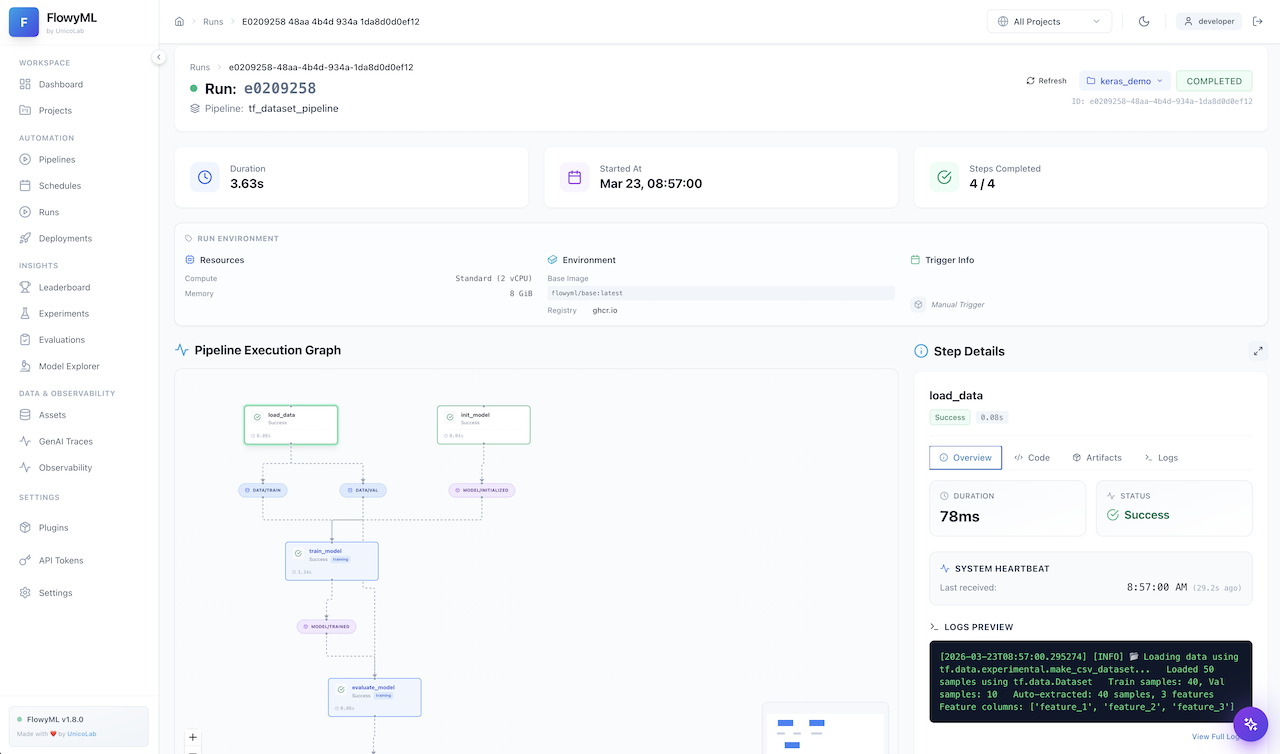
Here's what a completed pipeline run looks like in the FlowyML GUI — every step, artifact, and metric is tracked automatically:
Advanced Features
Caching Pipeline
Demonstrates intelligent caching strategies:
from flowyml import Pipeline, step
import time

@step(cache="code_hash")
def expensive_step():
    """Only re-runs if code changes."""
    time.sleep(2)
    return "computed_result"

@step(cache="input_hash")
def dependent_step(data, param: int):
    """Re-runs if inputs or parameters change."""
    return f"{data}_{param}"

@step(cache=False)
def always_fresh():
    """Always executes (e.g., real-time data)."""
    return time.time()

pipeline = Pipeline("caching_demo", enable_cache=True)
pipeline.add_step(expensive_step)
pipeline.add_step(dependent_step)
pipeline.add_step(always_fresh)

# First run: all steps execute
result1 = pipeline.run()

# Second run: expensive_step and dependent_step cached!
result2 = pipeline.run()
📄 Full example: examples/caching_pipeline.py
Caching Best Practices
- Use
cache="code_hash"for steps with no external dependencies (pure functions) - Use
cache="input_hash"for steps whose output depends on input data - Use
cache=Falsefor steps that must always run (real-time data, API calls)
Conditional Pipeline
Use conditional execution based on runtime data:
from flowyml import Pipeline, step, when, unless

@step(outputs=["data_quality"])
def check_quality():
    return {"score": 0.85, "issues": 12}

@step(inputs=["data_quality"], outputs=["model"])
@when(lambda quality: quality["score"] > 0.8)
def train_if_quality_good(data_quality):
    """Only trains if data quality is good."""
    return "trained_model"

@step(inputs=["data_quality"])
@unless(lambda quality: quality["issues"] == 0)
def log_issues(data_quality):
    """Logs issues if any exist."""
    print(f"Found {data_quality['issues']} issues")

pipeline = Pipeline("conditional_example")
pipeline.add_step(check_quality)
pipeline.add_step(train_if_quality_good)
pipeline.add_step(log_issues)

result = pipeline.run()
📄 Full example: examples/conditional_pipeline.py
Working with Stacks
Local Stack Example
from flowyml import Pipeline, step, LocalStack

# Create a local stack with custom paths
stack = LocalStack(
    artifact_path="./my_artifacts",
    metadata_path="./my_metadata.db"
)

@step(outputs=["data"])
def process_data():
    return {"value": 42}

# Pipeline automatically materializes outputs to stack's artifact store
pipeline = Pipeline("stack_example", stack=stack)
pipeline.add_step(process_data)

result = pipeline.run()
# Artifacts saved to ./my_artifacts/project/date/run_id/data/process_data/
GCP Stack Example
from flowyml import Pipeline, step
from flowyml.stacks.gcp import GCPStack

# Configure GCP stack
stack = GCPStack(
    project_id="my-ml-project",
    region="us-central1",
    artifact_store={
        "bucket": "ml-artifacts",
        "prefix": "experiments"
    }
)

@step(outputs=["results"], resources={"gpu": 1})
def train_on_gcp(data):
    """Runs on GCP with GPU."""
    return train_model(data)

pipeline = Pipeline("gcp_training", stack=stack)
pipeline.add_step(train_on_gcp)

# Runs on GCP Vertex AI with artifacts in GCS
result = pipeline.run()
📂 Full example: examples/gcp_stack/
UI Integration
Real-time Monitoring
from flowyml import Pipeline, step
import time

@step(outputs=["data"])
def load_data():
    time.sleep(2)  # Simulate work
    return [1, 2, 3, 4, 5]

@step(inputs=["data"], outputs=["processed"])
def process(data):
    time.sleep(3)  # Simulate work
    return [x * 2 for x in data]

# Start UI first: flowyml ui start
pipeline = Pipeline("ui_demo")
pipeline.add_step(load_data)
pipeline.add_step(process)

# Run pipeline - watch live in UI at http://localhost:8080
result = pipeline.run(debug=True)
📄 Full example: examples/simple_pipeline_ui.py
Complete UI Integration
Full-featured example with metrics, artifacts, and visualization:
📄 Full example: examples/ui_integration_example.py
Custom Components
Custom Executor
from flowyml import Executor, ExecutionResult

class BatchExecutor(Executor):
    """Custom executor that batches operations."""

    def execute_step(self, step, inputs, context_params, cache_store=None):
        # Custom execution logic
        result = step.func(**inputs, **context_params)
        return ExecutionResult(
            step_name=step.name,
            success=True,
            output=result,
            duration_seconds=0.0
        )

# Use custom executor
pipeline = Pipeline("custom", executor=BatchExecutor())
📂 Full example: examples/custom_components/
Production Patterns
Complete ML Pipeline
End-to-end machine learning workflow with all features:
from flowyml import Pipeline, step, context, LocalStack
from flowyml import Dataset, Model, Metrics

ctx = context(
    data_path="data/training.csv",
    model_type="random_forest",
    validation_split=0.2,
    random_seed=42
)

stack = LocalStack()

@step(outputs=["dataset"])
def load_dataset(data_path: str):
    """Load and create dataset asset."""
    df = pd.read_csv(data_path)
    return Dataset.create(
        data=df,
        name="training_data",
        properties={"rows": len(df), "columns": list(df.columns)}
    )

@step(inputs=["dataset"], outputs=["features", "labels"])
def prepare_features(dataset, validation_split: float):
    """Engineer features and split data."""
    X, y = dataset.data.drop("target", axis=1), dataset.data["target"]
    return train_test_split(X, y, test_size=validation_split)

@step(inputs=["features", "labels"], outputs=["model"])
def train(features, labels, model_type: str):
    """Train and save model."""
    model = get_model(model_type)
    model.fit(features[0], labels[0])
    return Model.create(
        data=model,
        name=f"{model_type}_model",
        framework="sklearn"
    )

@step(inputs=["model", "features", "labels"], outputs=["metrics"])
def evaluate(model, features, labels):
    """Evaluate model and save metrics."""
    predictions = model.data.predict(features[1])
    accuracy = accuracy_score(labels[1], predictions)
    return Metrics.create(
        accuracy=accuracy,
        model_name=model.name
    )

# Build production pipeline
pipeline = Pipeline("ml_production", context=ctx, stack=stack)
pipeline.add_step(load_dataset)
pipeline.add_step(prepare_features)
pipeline.add_step(train)
pipeline.add_step(evaluate)

# Run with full tracking
result = pipeline.run(debug=True)

if result.success:
    print(f"✓ Training complete!")
    print(f"  Model: {result.outputs['model'].name}")
    print(f"  Accuracy: {result.outputs['metrics'].accuracy:.2%}")
📄 Full example: examples/demo_pipeline.py
Running Examples
Clone and Setup
# Clone repository
git clone https://github.com/flowyml/flowyml.git
cd flowyml

# Install with examples dependencies
pip install -e ".[examples]"

# Or with poetry
poetry install --extras examples
Run an Example
# Run simple pipeline
python examples/simple_pipeline.py

# Run with UI
flowyml ui start  # In one terminal
python examples/simple_pipeline_ui.py  # In another
Modify and Experiment
All examples are designed to be modified and extended. Try:
- Changing context parameters
- Adding new steps
- Experimenting with different caching strategies
- Integrating your own data sources
Example Index
| Example | Features | Complexity |
|---|---|---|
simple_pipeline.py |
Basic pipeline structure | ⭐ |
clean_pipeline.py |
ETL pattern, caching | ⭐⭐ |
caching_pipeline.py |
Caching strategies | ⭐⭐ |
conditional_pipeline.py |
Conditional execution | ⭐⭐ |
simple_pipeline_ui.py |
UI integration | ⭐⭐ |
demo_pipeline.py |
Full ML pipeline, assets | ⭐⭐⭐ |
ui_integration_example.py |
Complete UI features | ⭐⭐⭐ |
gcp_stack/ |
Cloud deployment | ⭐⭐⭐⭐ |
custom_components/ |
Extensibility | ⭐⭐⭐⭐ |
What's Next?
📖 User Guide
Understand the core concepts behind pipelines, steps, and contexts in depth.
📡 API Reference
Explore every class, method, and parameter in the complete API docs.
🖥️ GUI Tour
See how your pipeline runs, metrics, and artifacts appear in the web dashboard.