📋 Overview
🚀 Deployment Guide
Deploy FlowyML anywhere — from your laptop to a fully managed cloud cluster. This guide gives you an overview of every deployment option and helps you choose the right path for your team.
🐳 Docker ☁️ Cloud ☸️ Kubernetes 🏭 Production
Deployment Options at a Glance
FlowyML supports a spectrum of deployment strategies — pick the one that matches your team size, infrastructure, and reliability requirements.
| Local | Docker Compose | Cloud (GCP / AWS) | |
|---|---|---|---|
| Best for | Solo developers, prototyping | Small teams, on-prem | Large teams, production |
| Setup time | < 1 min | ~5 min | ~30 min |
| Scalability | Single machine | Single machine / VM | Auto-scaling clusters |
| Persistence | Local filesystem | Docker volumes | Managed storage (GCS / S3) |
| GPU support | Native (if available) | NVIDIA Container Toolkit | Cloud GPU instances |
| Auth & security | None (local only) | Manual (reverse proxy) | IAM, OAuth, VPC |
| High availability | ❌ | ❌ | ✅ |
| Recommended use | Development | Staging / small prod | Enterprise production |
Not sure where to start?
If you're evaluating FlowyML for the first time, start with Local execution — zero setup required. When you're ready to share with your team, graduate to Docker Compose. For production workloads, follow the Cloud guides.
Local Execution
The fastest way to run FlowyML — no containers, no infrastructure. Just install and go.
# Install FlowyML
pip install flowyml

# Run a pipeline
python my_pipeline.py

# Launch the UI
flowyml ui
Local mode stores everything under ~/.flowyml by default (metadata DB, artifacts, logs). Great for development and experimentation.
Switching Modes
FlowyML defaults to local execution. You can switch to remote mode at any time:
Docker Compose Deployment
A centralized hub deployment allows your team to share pipelines, runs, and artifacts through a single server. It consists of the FlowyML backend (API & Orchestrator) and the frontend (UI).
Prerequisites
- Docker Engine ≥ 20.10
- Docker Compose ≥ 2.0
- (Optional) NVIDIA Container Toolkit for GPU support
Quick Start with make
FlowyML ships with a Makefile that wraps all Docker operations for convenience:
Step 1 — Build the Images
Builds the backend and frontend Docker images from the project Dockerfiles.
Step 2 — Start the Services
Launches all services in detached mode. The following containers will start:
| Service | Port | Description |
|---|---|---|
| Backend | 8000 |
REST API & orchestration engine |
| Frontend | 8080 |
Web dashboard (GUI) |
Additional Docker Commands
| Command | Description |
|---|---|
make docker-build |
Build all Docker images |
make docker-up |
Start all services (detached) |
make docker-down |
Stop and remove containers |
make docker-logs |
Stream logs from all services |
make docker-status |
Show running container status |
make docker-restart |
Restart all services |
Configuration
Customize the deployment by setting environment variables in docker-compose.yml or a .env file:
# .env
FLOWYML_HOME=/root/.flowyml
FLOWYML_UI_HOST=0.0.0.0
FLOWYML_UI_PORT=8000
FLOWYML_LOG_LEVEL=INFO
FLOWYML_DB_URL=sqlite:///root/.flowyml/metadata.db
| Variable | Description | Default |
|---|---|---|
FLOWYML_HOME |
Path to FlowyML data directory | /root/.flowyml |
FLOWYML_UI_HOST |
Host to bind the backend to | 0.0.0.0 |
FLOWYML_UI_PORT |
Port for the backend API | 8000 |
FLOWYML_LOG_LEVEL |
Logging verbosity | INFO |
FLOWYML_DB_URL |
Metadata database URL | SQLite (local) |
Data Persistence
The docker-compose.yml mounts a volume for data persistence:
This ensures that your metadata database, artifacts, and logs are preserved across container restarts.
Backup Your Data
For production deployments, regularly back up the .flowyml directory. For high-reliability setups, consider using an external PostgreSQL database and cloud object storage (S3 / GCS) instead of SQLite and local volumes.
Deployment Dashboard
The FlowyML GUI includes a built-in Deployment Lab for managing model endpoints directly from the browser:
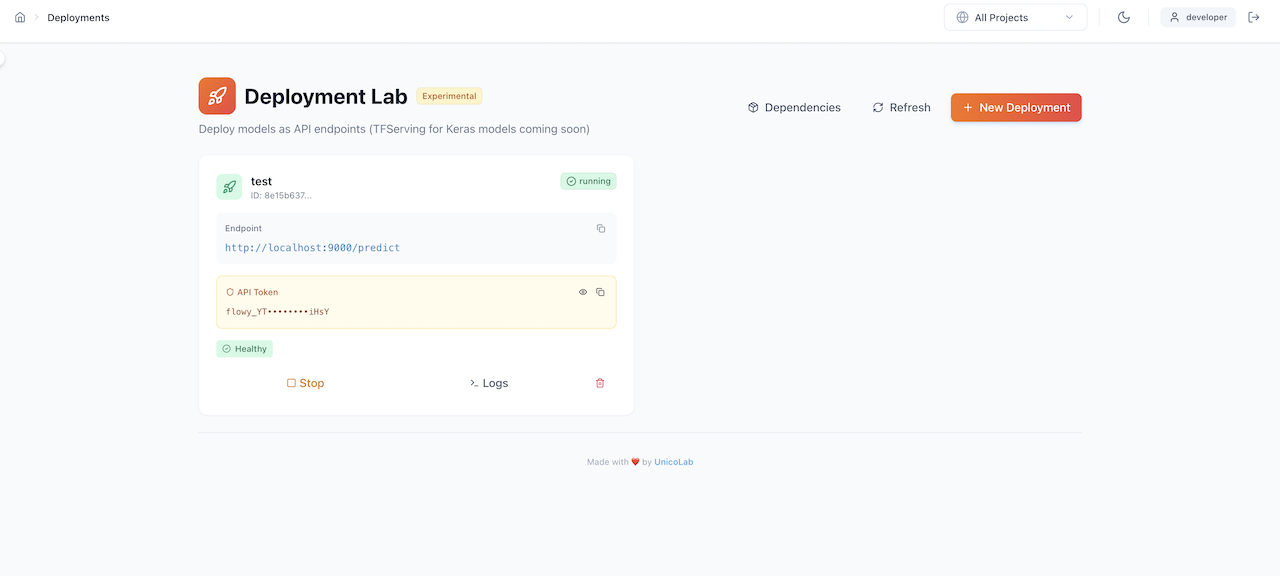
From the Deployment Lab you can:
- Deploy trained models as REST API endpoints
- Monitor endpoint health with real-time status indicators
- Manage API tokens for secure access
- View deployment logs and manage lifecycle (stop, restart, delete)
Client Configuration
Once your centralized hub is running, point your local CLI or SDK to the remote server.
Cloud Deployment
For production workloads, deploy FlowyML on managed cloud infrastructure with auto-scaling, GPU support, and enterprise security.
☁️ Google Cloud Platform
Deploy on GCP with Vertex AI orchestration, GCS artifact storage, and Cloud Run serving.
🔐 Secrets Management
Securely manage API keys, credentials, and sensitive configuration across environments.
Production Considerations
Security First
The default Docker Compose setup does not include authentication. For production deployments, you must add a security layer.
Security
- Deploy behind a reverse proxy (Nginx, Traefik, Caddy) with TLS termination
- Add authentication via OAuth2 Proxy, Auth0, or your identity provider
- Restrict network access with VPC / firewall rules
- Rotate API tokens regularly
Storage & Databases
- Replace SQLite with PostgreSQL for concurrent access and reliability
- Use cloud object storage (GCS, S3, Azure Blob) for artifact persistence
- Enable automated backups and point-in-time recovery
Scalability
- Scale backend workers behind a load balancer
- Use a dedicated task queue (Celery + Redis) for pipeline orchestration
- Deploy on Kubernetes for auto-scaling and self-healing
Monitoring
- Export metrics to Prometheus / Grafana for infrastructure monitoring
- Enable structured logging with JSON format for log aggregation
- Set up alerting for failed pipelines, high latency, and resource exhaustion
What's Next?
🏭 Production Deployment
Harden your setup with TLS, auth, PostgreSQL, and horizontal scaling.
🔐 Secrets Management
Configure secrets, credentials, and environment-specific variables securely.